Experiment tracking with WandB
Weights and Biases is an experment tracking tool that is great for its lightweight logging utilities.
Setup WandB
After initializing a run, we can track all the Damuta model specs to the wandb run config. Specs you may want to track are: datasets (as artifacts), model parameters (as a config) or metrics and plots (as logged data)
Warning: Certain private health data may not be appropriate to upload to wandb. See storage FAQ to ensure that wandb policies are compliant with your data-handling requirements.
See the wandb dashboard associated with this notebook here
[ ]:
import wandb
import pandas as pd
import damuta as da
[2]:
# Initialize wandb run
run = wandb.init()

# Read in example pcawg data
counts = pd.read_csv('example_data/pcawg_counts.csv', index_col=0)
annotation = pd.read_csv('example_data/pcawg_cancer_types.csv', index_col=0)

# Log data as an artifact
artifact = wandb.Artifact('pcawg', type='dataset')
artifact.add(wandb.Table(data=counts), 'counts')
artifact.add(wandb.Table(data=annotation), 'annotation')
wandb.log_artifact(artifact)

# Create input DataSet
pcawg = da.DataSet(counts,annotation)
wandb: Currently logged in as: harrig12 (use `wandb login --relogin` to force relogin)
wandb: wandb version 0.12.11 is available!  To upgrade, please run:
wandb:  $ pip install wandb --upgrade
Syncing run fanciful-gorge-25 to Weights & Biases (Documentation).
Project page: https://wandb.ai/harrig12/damuta-docs_examples
Run page: https://wandb.ai/harrig12/damuta-docs_examples/runs/281tmodh
Run data is saved locally in
/lila/home/harrigan/damuta/docs/examples/wandb/run-20220329_135008-281tmodh[3]:
# Instantiate the model
model = da.models.Lda(pcawg, n_sigs = 20)

# Log model parameters, and fitting parameters to wandb
run.config.update({"n_sigs": model.n_sigs, "init_strategy": model.init_strategy,
                   "opt_method": model.opt_method, "seed": model.seed,
                   })

# Fit the model
model.fit(n=1000)
Finished [100%]: Average Loss = 4.9086e+07
[3]:
<damuta.models.Lda at 0x7f0b0c29f550>
If necessary, The wandb config can also be updated after model.fit() has been called.
Now that we have fit the model, we can plot the ELBO, and log the final value with wandb.
[4]:
import matplotlib.pyplot as plt
plt.plot(model.approx.hist)
[4]:
[<matplotlib.lines.Line2D at 0x7f0a9c26bca0>]
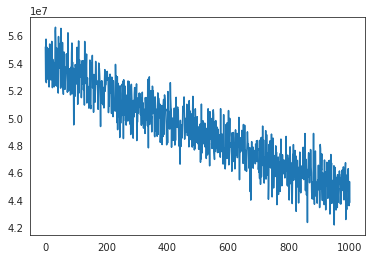
[5]:
wandb.log({"final ELBO value": model.approx.hist[-1]})
wandb.finish()
Waiting for W&B process to finish, PID 405371
Program ended successfully.
/lila/home/harrigan/damuta/docs/examples/wandb/run-20220329_135008-281tmodh/logs/debug.log/lila/home/harrigan/damuta/docs/examples/wandb/run-20220329_135008-281tmodh/logs/debug-internal.logRun summary:
| final ELBO value | 43818341.95693 |
| _runtime | 657 |
| _timestamp | 1648576865 |
| _step | 0 |
Run history:
| final ELBO value | ▁ |
| _runtime | ▁ |
| _timestamp | ▁ |
| _step | ▁ |
Callbacks
We can also make use of callbacks to log this value over the course of the fitting procedure. This way, our ELBO plot will be automatically generated by wandb, and will live-update on the wandb dashboard as we fit the model. Let ‘s create a new run with a callback to demonstrate this.
[9]:
from damuta.callbacks import LogELBO

# Initialize run
my_config={"n_sigs": 20,
           "init_strategy": "uniform",
           "opt_method": "ADVI",
           "seed": 360
          }

run = wandb.init(config = my_config)

# Log data
artifact = wandb.Artifact('pcawg', type='dataset')
artifact.add(wandb.Table(data=counts), 'counts')
artifact.add(wandb.Table(data=annotation), 'annotation')
wandb.log_artifact(artifact)

# Build and fit the model
model = da.models.Lda(dataset = da.DataSet(counts, annotation), **my_config)
model.fit(n=1000, callbacks = [LogELBO(every=1)])
wandb: wandb version 0.12.11 is available!  To upgrade, please run:
wandb:  $ pip install wandb --upgrade
Syncing run helpful-wildflower-28 to Weights & Biases (Documentation).
Project page: https://wandb.ai/harrig12/damuta-docs_examples
Run page: https://wandb.ai/harrig12/damuta-docs_examples/runs/3ox666dh
Run data is saved locally in
/lila/home/harrigan/damuta/docs/examples/wandb/run-20220329_140208-3ox666dh
Finished [100%]: Average Loss = 4.9012e+07
[9]:
<damuta.models.Lda at 0x7f0a4c26b820>
[11]:
wandb.finish()
Waiting for W&B process to finish, PID 410928
Program ended successfully.
/lila/home/harrigan/damuta/docs/examples/wandb/run-20220329_140208-3ox666dh/logs/debug.log/lila/home/harrigan/damuta/docs/examples/wandb/run-20220329_140208-3ox666dh/logs/debug-internal.logRun summary:
| ELBO | 43278176.76101 |
| _runtime | 608 |
| _timestamp | 1648577536 |
| _step | 999 |
Run history:
| ELBO | ███▇▇█▆▆▆▇▆▆▆▆▅▅▄▅▅▄▄▅▃▅▄▄▄▄▂▄▃▂▃▃▂▁▂▁▂▂ |
| _runtime | ▁▁▁▁▂▂▂▂▂▃▃▃▃▃▃▄▄▄▄▄▅▅▅▅▅▅▆▆▆▆▆▇▇▇▇▇▇███ |
| _timestamp | ▁▁▁▁▂▂▂▂▂▃▃▃▃▃▃▄▄▄▄▄▅▅▅▅▅▅▆▆▆▆▆▇▇▇▇▇▇███ |
| _step | ▁▁▁▂▂▂▂▂▂▃▃▃▃▃▄▄▄▄▄▄▅▅▅▅▅▅▆▆▆▆▆▇▇▇▇▇▇███ |
Callbacks can be implemented by extending the Callback class. At minimum, they need a __call__ method with signature (self, approx, loss, i). See pymc3 docs for moer details.
Here’s the definition of LogELBO, the callback we just used:
class LogELBO(Callback):
    """Log ELBO using `wandb.log()`. `wandb.init()` must be run first.

    Parameters
    ----------
    every: int
        Frequency at which wandb.log() is called

    Examples
    --------
    >>> with model:
    ...     approx = pm.fit(n=1000, callbacks=[LogELBO(every=50)])
    """

    def __init__(self, every=100):
        self.every = every

    def __call__(self, approx, loss, i):
        if i % self.every or i < self.every:
            return

        wandb.log({"ELBO": loss[i-1]})